If your front desk or phone line is constantly overwhelmed with “Are you open?”, “What’s today’s special?”, and last-minute table requests, you’re exactly the kind of restaurant that can benefit from an AI chatbot for restaurants.
The right chatbot can quietly handle WhatsApp orders, FAQs, and basic reservations in the background while your team focuses on food and guests. The wrong setup just frustrates customers and adds more work for staff.
This guide breaks down where AI chatbots genuinely help, where humans are still essential, and how to roll out a bot without breaking your service flow. For a broader view of automation across your operations, you can also review our restaurant automation checklist once you’re done here.
What is an AI chatbot for restaurants?
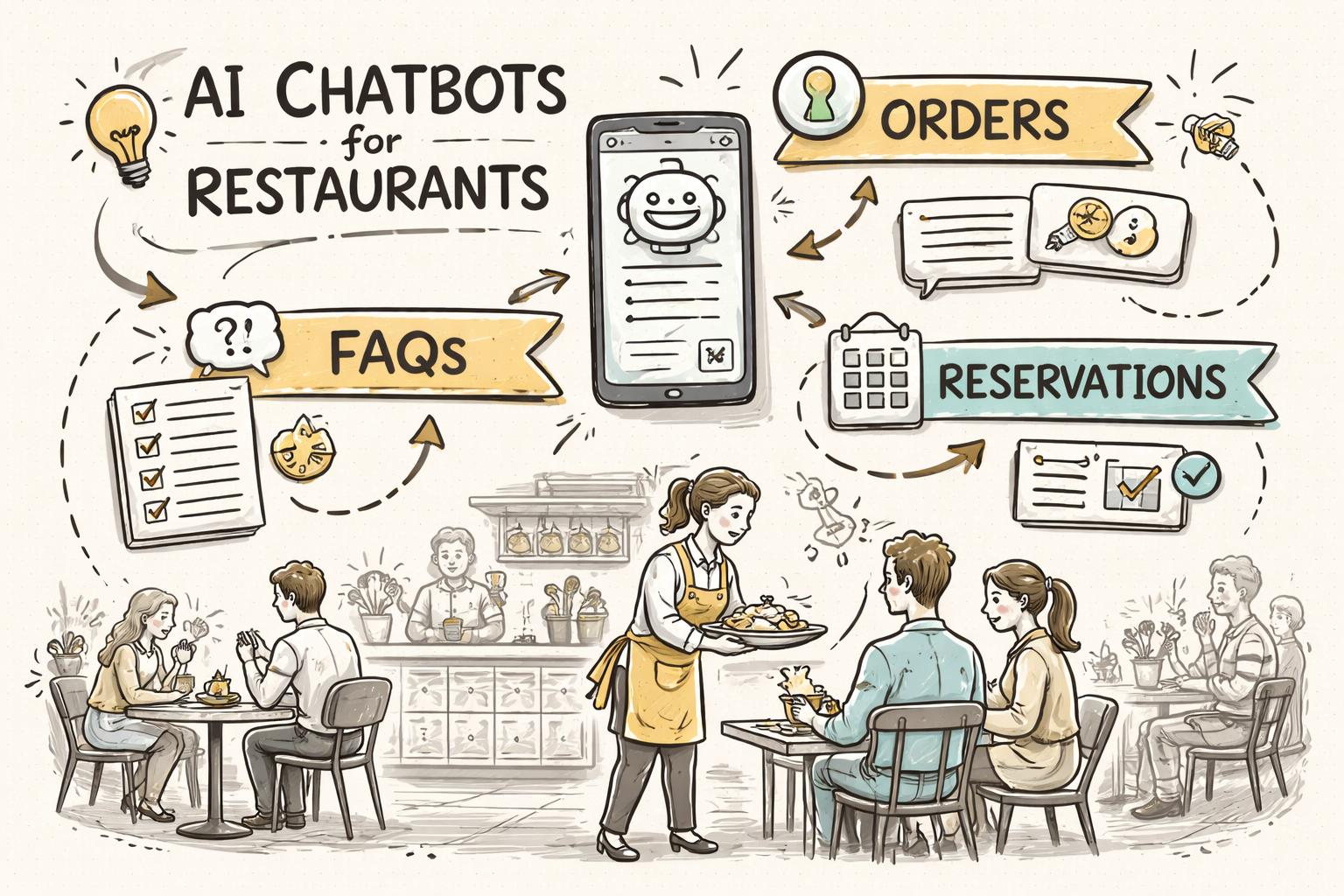
An AI chatbot for restaurants is a conversational assistant that can talk to your guests over channels like WhatsApp, your website, Instagram, or Facebook Messenger. Instead of staff answering every message, the bot uses AI (often a restaurant-trained LLM) to understand what guests want and respond instantly.
Unlike old-school “press 1, press 2” bots, modern systems like Waitwhiz can:
Read and understand natural language (e.g., “Can I book a table for 4 tomorrow 8pm?”)
Pull from your live menu, timings, and policies to answer accurately
Hand over to a human when the request is complex or sensitive
Most restaurants start with a WhatsApp bot for food ordering and FAQs because that’s where their customers already are. Later, they expand into marketing, loyalty, and delivery updates using the same AI backbone.
Key use cases: where AI chatbots genuinely help
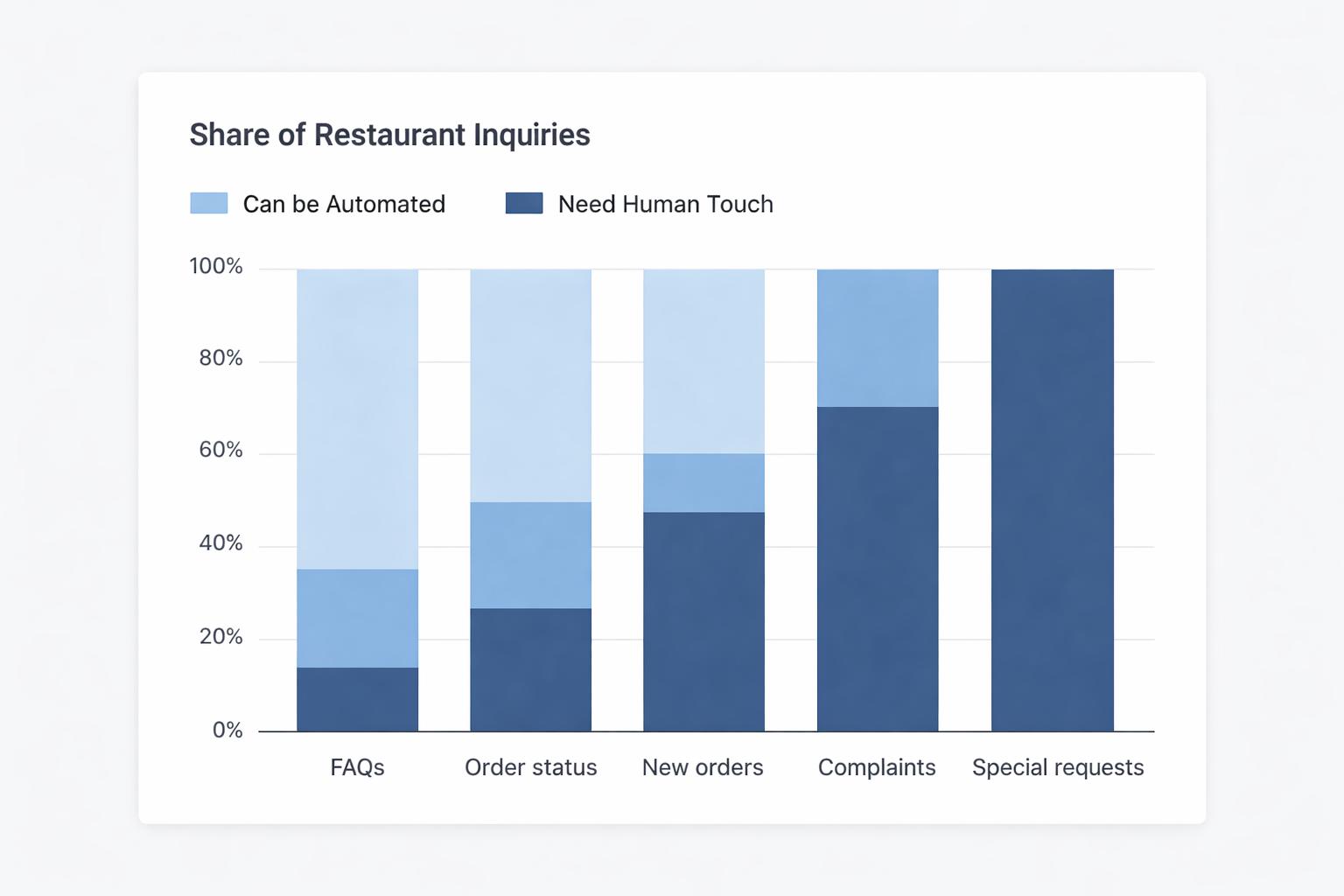
Not every guest interaction should be automated. But there are several high-volume, repetitive workflows where an AI chatbot can do 80–90% of the work with high accuracy.
1. Answering FAQs 24/7
FAQs are usually the first win. An AI-powered chatbot can instantly answer questions like:
Because a restaurant LLM platform like Waitwhiz is trained on restaurant-specific language and your own data (menu, hours, policies), it can respond accurately even when guests phrase things in different ways.
That means fewer phone calls interrupting service and fewer DMs piling up on your social accounts.
2. Taking orders via WhatsApp or web chat
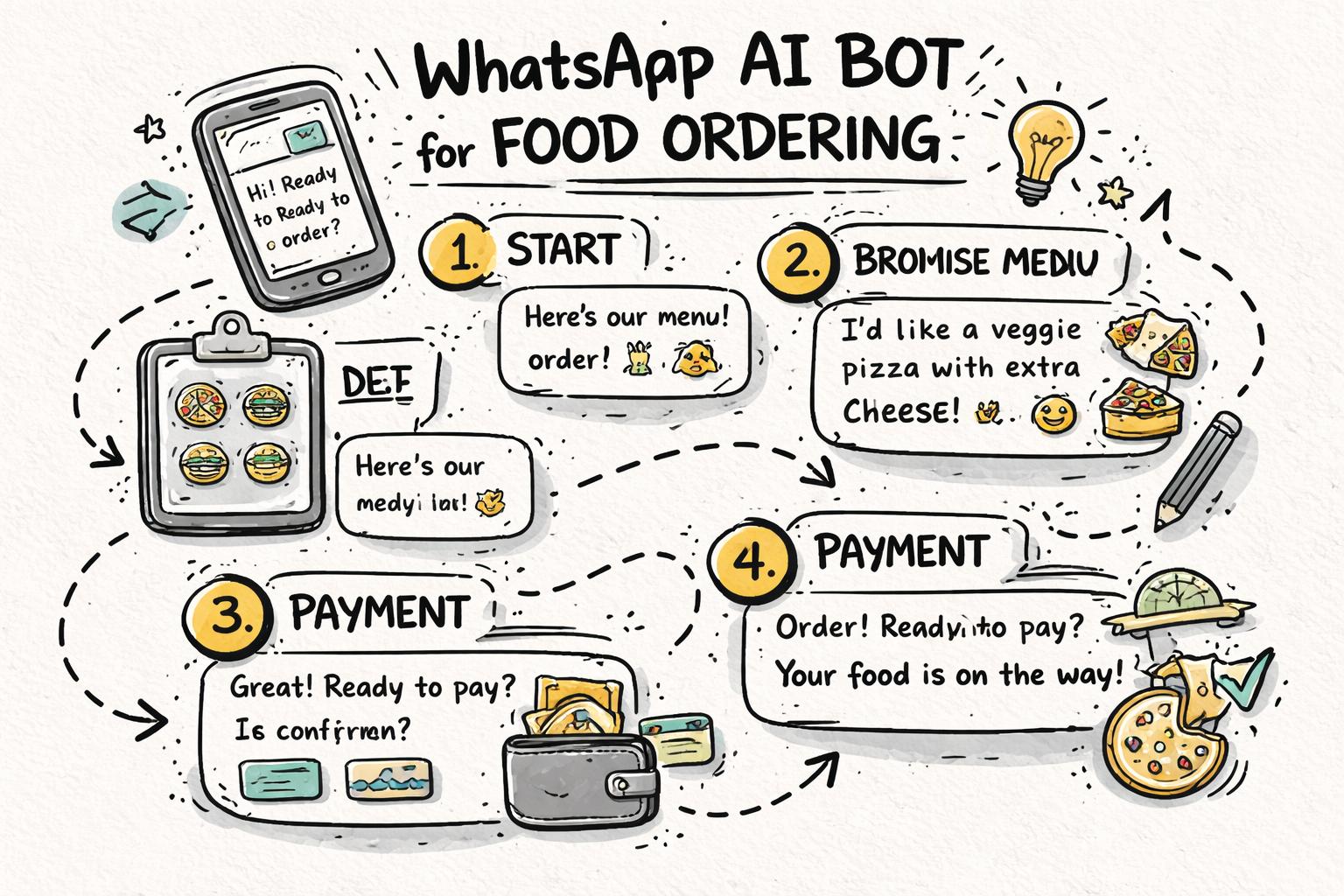
Order-taking is where AI chatbots start driving direct revenue. A well-designed WhatsApp bot for food ordering can guide guests from “Hi” to “Order confirmed” without human input.
A typical flow looks like this:
Greet the guest and detect intent (“I want to order food”)
Share a structured, searchable menu (categories, add-ons, combos)
Handle choices and customizations (“no onions”, “extra cheese”)
Ask for delivery vs pickup, address, and time
Pass payment to your gateway (UPI, card, wallet) and confirm
Because the bot never forgets to upsell (“Would you like fries or a drink with that?”), many restaurants see a higher average order value compared to phone orders. For a deeper breakdown of how this works end-to-end, see our guide to AI WhatsApp ordering for restaurants.
3. Managing basic reservations and waitlists
AI chatbots can handle simple reservation flows, especially over WhatsApp:
Ask for date, time, and party size
Check table availability based on your rules
Confirm or suggest alternative slots
Send reminders and allow quick “Yes/No” confirmations
They’re particularly effective for:
Handling off-hours booking requests when no one is answering the phone
Reducing no-shows with automated WhatsApp reminders
Keeping a live waitlist on busy nights so hosts aren’t juggling paper lists
4. Order status updates and delivery communication
A big chunk of customer messages are “Where is my order?” or “Has it left yet?”. An AI-powered customer support bot can connect to your POS or delivery system and respond automatically:
“Your order is being prepared (approx. 15–20 mins)”
“Your rider has picked up the order and is on the way”
“Your order was delivered 5 minutes ago. How was everything?”
Combine this with AI voice calling for food delivery and you can automate both chat and phone updates, cutting failed deliveries and missed calls.
5. Handling simple complaints and feedback
Not every complaint requires a manager on the phone. A chatbot can safely handle:
Late delivery apologies and small make-good coupons
Minor quality issues (slightly cold food, missing cutlery)
Collecting structured feedback after visits or deliveries
The key is to set clear rules about what the bot can authorize (e.g., up to a certain discount amount) and when to escalate to a human.
6. Restaurant WhatsApp marketing and re-engagement
Once you’re handling orders and support via chat, you’re also quietly building a contact list. With the right permissions, you can use that list for restaurant WhatsApp marketing strategies that actually drive repeat orders.
An AI chatbot can help by:
Segmenting guests (regulars, lunch crowd, weekend families, vegetarians, etc.)
Sending personalized offers (“Your usual paneer tikka is 15% off tonight”)
Reactivating lapsed customers with smart nudges
Here, the AI doesn’t just send bulk blasts; it uses behavior and order history to time and tailor messages.
7. Building a usable restaurant CRM in the background
Every chat—order, complaint, reservation—adds to a guest profile. Over time, your chatbot becomes the front door to a restaurant CRM and loyalty system.
Platforms like Waitwhiz unify this into a single view of each guest: their favorite dishes, visit frequency, typical spend, and response to offers. To see how this data turns into revenue, explore our guide on restaurant CRM and loyalty with AI.
What AI chatbots can’t (and shouldn’t) do
AI has improved dramatically, but there are still clear limits—especially in hospitality, where emotions run high and context matters.
1. Handling highly emotional or serious complaints
If a guest is extremely upset, mentions food poisoning, allergies gone wrong, or safety concerns, a bot should not try to “handle” it. It should:
Recognize the seriousness of the message
Respond with empathy and transparency
Immediately route the conversation to a manager or owner
According to research on guest expectations in hospitality, human response in critical moments is still a major driver of loyalty and reviews. AI should support that, not replace it.
2. Making complex judgment calls
Examples where humans should stay in control:
Large group or event bookings with custom menus
Negotiating special pricing or long-term corporate deals
Handling VIP guests with special preferences
A good AI chatbot can collect initial details and schedule a callback, but final decisions should come from a person.
3. Overriding your policies or local regulations
AI should never invent policies, promise things you can’t deliver, or ignore local regulations (e.g., alcohol delivery rules, age verification). Your system must be configured with clear boundaries so it only operates within your rules.
Modern LLM-based systems use “guardrails” and policy layers to avoid hallucinations, but you should still test thoroughly. The OpenAI research library has useful papers on alignment and safety you can share with your tech team or vendor.
4. Replacing your brand’s personality
Guests come to you for your food and your vibe. If your chatbot feels generic or robotic, it can damage that experience.
Instead of letting the AI “speak however it wants”, you should:
Define a clear tone of voice (friendly, casual, family-style, premium, etc.)
Provide example replies that match your brand
Regularly review transcripts and fine-tune responses
5. Operating without human backup
No matter how good your chatbot is, there will always be edge cases. You need:
A clear “Talk to a human” or “Call us” option in every flow
Dashboard or mobile alerts for staff when a conversation is escalated
Shift-based routing so the right outlet or manager gets notified
The best setups use AI as the first line, with humans as the final line of service.
How to decide what to automate first
If you try to automate everything at once, you’ll create chaos. A better approach is to start with one or two clear, high-ROI workflows.
Step 1: Map your current guest conversations
Look at a week’s worth of:
Group them into categories:
Basic FAQs (hours, location, menu items)
New orders
Order status updates
Reservations
Complaints / feedback
Marketing / offers queries
You’ll usually find that 50–70% of messages are simple, repetitive questions that a bot can handle with high confidence. This matches findings from multiple hospitality and leisure studies on digital service interactions.
Step 2: Prioritize by impact and risk
For each category, rate:
Volume: How many such messages per day?
Revenue impact: Does this directly drive sales?
Risk: What happens if the bot makes a mistake?
Then pick 1–2 workflows that are:
For most restaurants, the first candidates are:
Step 3: Design the “happy path” and the escape routes
For each chosen workflow, define:
The ideal conversation from start to finish (the “happy path”)
Common variations (e.g., “I’m allergic to nuts”, “Can I split the bill?”)
Clear points where the bot should stop and hand over to a human
This is where working with a restaurant-focused platform like Waitwhiz helps, because many of these flows are already pre-built and battle-tested across hundreds of locations.
Not all chatbots are built for restaurants. Generic tools can answer simple FAQs, but they struggle with menus, modifiers, delivery details, and multi-location logic.
1. Restaurant-trained LLM and menu understanding
Your chatbot should be able to:
Understand dish names, ingredients, and dietary tags
Handle modifications (“no cheese”, “extra spicy”, “gluten-free base”)
Recommend items based on preferences (“something light and vegetarian”)
Waitwhiz uses a proprietary in-house LLM trained specifically on restaurant menus and guest conversations, which reduces hallucinations and improves accuracy compared to generic models.
2. Deep WhatsApp and voice integration
For most markets, WhatsApp is the highest-converting channel for restaurant customer engagement. Look for:
Official WhatsApp Business API integration (not just a hacked web interface)
Support for templates, quick replies, and rich media menus
Ability to combine chat with AI voice calls for delivery and pickup updates
This is where platforms like Waitwhiz shine, offering both AI-powered WhatsApp ordering and broader AI for restaurants automation in one place.
3. POS, delivery, and CRM connectivity
To avoid double work and errors, your AI chatbot should plug into:
Your POS or ordering system (for menu, pricing, order creation)
Delivery partners or your in-house logistics (for status updates)
Your CRM or guest database (for personalization and loyalty)
If you don’t have a CRM yet, choose a platform that includes one so your chatbot can start building it automatically.
4. Multi-location and multi-brand support
If you run more than one outlet or brand, your chatbot must:
Route guests to the right location based on area or user choice
Handle different menus, timings, and offers per outlet
Allow central oversight with local control where needed
Waitwhiz was designed with multi-brand groups in mind, so you can roll out one AI layer across multiple concepts without confusing guests.
AI is only as good as its collaboration with your team. Look for:
Live chat handover when the bot gets stuck
Mobile or web dashboards your staff can actually use during service
Conversation history so staff see context before responding
6. Analytics and continuous improvement
Your chatbot should help you answer questions like:
What percentage of conversations are fully automated?
Where do guests drop off in the order flow?
Which campaigns or offers drive the most repeat orders?
Use this data to refine flows, update menus, and adjust your marketing. Over time, your AI assistant should get smarter and more profitable, not just “stay on” in the background.
Practical setup tips for your first restaurant chatbot
Once you’ve chosen a platform, here’s how to roll it out with minimal disruption.
1. Start with one channel and one main use case
Instead of launching everywhere at once, pick:
Channel: usually WhatsApp or your website chat
Use case: FAQs, basic ordering, or reservations
Prove value there—fewer calls, faster replies, visible revenue—then expand to more flows and channels.
2. Keep the conversation simple and structured
Yes, LLMs can handle free-form chat, but structure is your friend in a busy restaurant. Use:
Quick reply buttons for common actions (“View menu”, “Track order”, “Book a table”)
Short, clear questions (one thing at a time)
Summaries before confirmation (“You ordered X, Y, Z for delivery to…”)
This reduces errors and makes the experience feel fast and professional.
3. Train your staff to work with the bot
AI is not “set and forget”. Your team should know:
How to see and take over live conversations
How to flag wrong answers so they can be fixed
Which situations must always be handled by a human
Make it clear that the bot is there to remove boring, repetitive tasks—not to replace your best people.
Run a “soft launch” with limited visibility:
Enable the bot but don’t heavily advertise it yet
Invite a small group of regulars to try it and share feedback
Monitor transcripts daily for the first few weeks
Fix obvious issues (wrong answers, confusing flows) before you start printing QR codes and promoting WhatsApp ordering everywhere.
Once you’re confident, make it easy for guests to find and use your chatbot:
Place WhatsApp QR codes on tables, takeaway packaging, and receipts
Add “Order on WhatsApp” and “Chat with us” buttons to your website and social profiles
Train front-of-house staff to mention the option to regulars
At least once a month, review:
Automation rate (how many chats resolved without humans)
Revenue from chatbot-driven orders
Common failure points or escalations
Use these insights to decide your next automation step—maybe adding reservations, then post-meal feedback, then loyalty campaigns.
Where an AI chatbot fits in your broader restaurant strategy
An AI chatbot is not a gimmick; it’s a new “front door” to your restaurant. When combined with CRM, marketing automation, and delivery operations, it becomes a core part of how you acquire, serve, and retain guests.
With a platform like Waitwhiz, you can start with a simple AI chatbot for restaurants on WhatsApp, then expand into:
Full WhatsApp ordering and order tracking
Automated delivery and pickup calls
Segmentation-based WhatsApp marketing and loyalty
Centralized guest CRM and analytics across locations
If you’re ready to explore what this could look like for your brand, use this guide as your checklist and start by mapping your conversations. From there, you’ll know exactly which chatbot use case to tackle first—and how to keep the human touch where it matters most.